initial test by Oppkey prior to asking RICOH
Z1 with firmware 3.40.3
prep
- reset theta settings
- set to 5GHz WiFi (optional)
- set sleep delay to 30 minutes (optional)
- set off delay to 50 minutes (optional)
test configuration
- set filter to HDR - success
- set file format to
{"type": "raw+","width": 6720,"height": 3360}- success
NOTE: at this point, the command should have failed if the API documentation was correct. As the command succeeded, there’s an indication already that the API docs need to be updated.
Using get options, we confirm settings:
  "name" : "camera.getOptions",
  "results" : {
    "options" : {
      "captureMode" : "image",
      "fileFormat" : {
        "height" : 3360,
        "type" : "raw+",
        "width" : 6720
      },
      "_filter" : "hdr",
      "iso" : 0,
      "offDelay" : 3000,
takePicture - success. shutter goes off once.
checking camera files from Mac laptop using USB API (since I already had the Z1 connected with a USB cable)
gphoto2 --list-files | grep dng
125   R0020001.DNG               rd 39380 KB 7296x3648 image/x-adobe-dng 1694804447
#126   R0020001_HDR.DNG           rd 52376 KB image/x-adobe-dng 0
transfer file to Mac
gphoto2 --get-file 125
Saving file as R0020001.DNG
photo2 --get-file 126
Saving file as R0020001_HDR.DNG
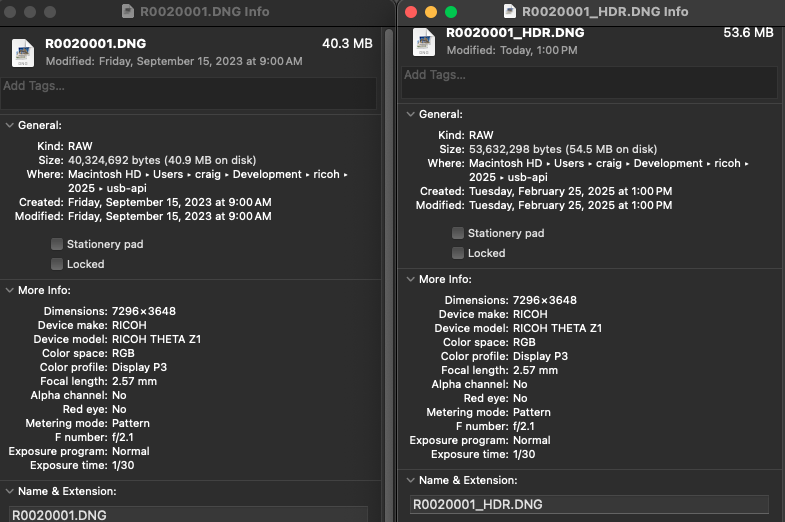
verify 16 bit
*The new RAW (DNG) files are 16-bit, meaning the file size has increased from about 50MB to about 60MB.
Using exiftool on file with _HDR.DNG extension
exiftool -BitsPerSample R0020001_HDR.DNG
Bits Per Sample                 : 16
result: indicates that file is HDR, 16 bit
Using exiftool on control with only .DNG extension
exiftool -BitsPerSample R0020001.DNG
Bits Per Sample                 : 12
result: indicates that the .DNG file (no HDR) is 12 bit